Configuration#
Beam Corset’s visualization functions offer quite a few customization options. In most scenarios, the default settings should be sufficient. However, if you want to overwrite them for one call, you will most likely want to adjust them for all calls. This can be facilitated using the Config class and its inner classes that hold global configuration options as class variables.
The available configuration options are listed in the corset.config module documentation.
Plotting Functions#
For example, for optical setup plots and related plots, we can specify whether we want to show a legend or not or which units to use for which quantities.
[1]:
from corset import Beam

beam = Beam.from_gauss(0, 100e-6, 1064e-9)
beam.plot(show_legend=True); # show the legend
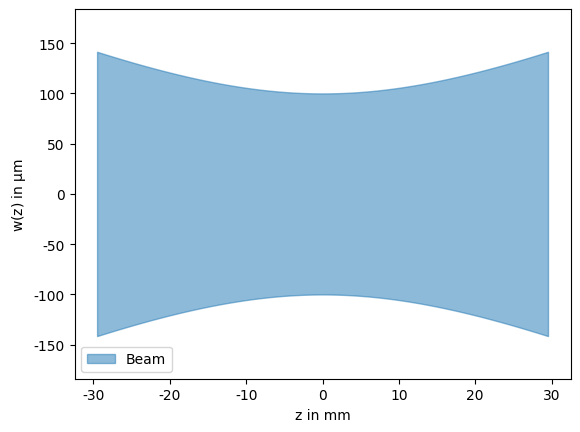
If no value is passed, as we would typically do in most situations, the value for show_legend is taken from the global configuration value Config.PlotSetup.show_legend. Using the config, we can set this value without having to specify it at each call. This also means we can specify it in cases where we can not explicitly pass arguments like the implicit plotting done for PNG representations in Jupyter notebooks.
[2]:
from corset import Config

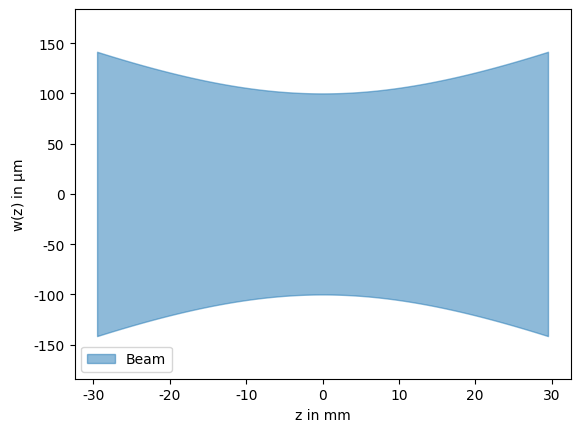
Config.PlotSetup.show_legend = True
beam # implicit Beam.plot() call uses config values
[2]:
One common use case where this is also very practical is to explicitly set the ranges of the reachability and sensitivity plots so they share the same scale across all solutions. In this case we do not specify the ranges in the Config.PlotReachability and Config.PlotSensitivity inner classes, because they interpret no values as using automatic range instead of resorting to configuration values. Instead, we set the Config.PlotAll.reachability_kwargs and Config.PlotAll.sensitivity_kwargs dictionaries which ModeMatchingSolution.plot_all() uses to pass arguments to the respective plotting functions.
[3]:
from corset import ThinLens, ShiftingRange, mode_match

solutions = mode_match(Beam.from_gauss(0.0, 500e-6, 1064e-9), Beam.from_gauss(1.0, 100e-6, 1064e-9), [ShiftingRange(0.0, 0.8)], [ThinLens(f) for f in [100e-3, 150e-3]], 2, 2)

# fix ranges so they are the same for all plots
Config.PlotAll.reachability_kwargs = {"focus_range": (-20e-3, 20e-3), "waist_range": (90e-6, 110e-6)}
Config.PlotAll.sensitivity_kwargs = {"x_displacement": 10e-3, "y_displacement": 20e-3}
solutions.display_all()
Element Summary
| element | shape | focal_length | position | clearance_left | clearance_right | dof | sensitivity | grad_focus | grad_waist | sensitivities | couplings | shifting_range | |
|---|---|---|---|---|---|---|---|---|---|---|---|---|---|
| 0 | f=100mm | | | 100 mm | 472 mm | 472 mm | 265 mm | 0 | 10.88 %/cm² | 2.591 mm/mm | 1.588 μm/mm | [10.88, -7.07] %/cm² | [100. , -97.9] % | ShiftingRange(left=0.0, right=0.8, min_element... |
| 1 | f=100mm | | | 100 mm | 737 mm | 265 mm | 63 mm | 1 | 4.80 %/cm² | -1.557 mm/mm | -1.625 μm/mm | [-7.07, 4.8 ] %/cm² | [-97.9, 100. ] % | ShiftingRange(left=0.0, right=0.8, min_element... |

Element Summary
| element | shape | focal_length | position | clearance_left | clearance_right | dof | sensitivity | grad_focus | grad_waist | sensitivities | couplings | shifting_range | |
|---|---|---|---|---|---|---|---|---|---|---|---|---|---|
| 0 | f=100mm | | | 100 mm | 273 mm | 273 mm | 351 mm | 0 | 7.81 %/cm² | 2.260 mm/mm | 0.988 μm/mm | [ 7.81, -4.45] %/cm² | [100., -98.] % | ShiftingRange(left=0.0, right=0.8, min_element... |
| 1 | f=150mm | | | 150 mm | 624 mm | 351 mm | 176 mm | 1 | 2.64 %/cm² | -1.221 mm/mm | -1.002 μm/mm | [-4.45, 2.64] %/cm² | [-98., 100.] % | ShiftingRange(left=0.0, right=0.8, min_element... |

Element Summary
| element | shape | focal_length | position | clearance_left | clearance_right | dof | sensitivity | grad_focus | grad_waist | sensitivities | couplings | shifting_range | |
|---|---|---|---|---|---|---|---|---|---|---|---|---|---|
| 0 | f=150mm | | | 150 mm | 252 mm | 252 mm | 452 mm | 0 | 1.51 %/cm² | 0.949 mm/mm | 0.658 μm/mm | [ 1.51, -0.09] %/cm² | [100. , -15.6] % | ShiftingRange(left=0.0, right=0.8, min_element... |
| 1 | f=150mm | | | 150 mm | 704 mm | 452 mm | 96 mm | 1 | 0.22 %/cm² | 0.090 mm/mm | -0.649 μm/mm | [-0.09, 0.22] %/cm² | [-15.6, 100. ] % | ShiftingRange(left=0.0, right=0.8, min_element... |

Customizing Tables#
We can also use the config to specify which columns to show in the various DataFrame based representations.
[4]:
Config.Repr.solution_summary_columns = ["overlap", "elements", "max_sensitivity", "min_coupling"]
solutions
[4]:
| overlap | elements | max_sensitivity | min_coupling | |
|---|---|---|---|---|
| 0 | 100.0 % | [f=100mm, f=100mm] | 10.88 %/cm² | 97.9 % |
| 1 | 100.0 % | [f=100mm, f=150mm] | 7.81 %/cm² | 98.0 % |
| 2 | 100.0 % | [f=150mm, f=150mm] | 1.51 %/cm² | 15.6 % |
The Repr config section also includes a convenience function Config.Repr.set_minimal() to set all three configurable tables to a minimal set of columns to reduce clutter.
Units#
While Beam Corset uses SI basis units internally, the plots and tables are displayed using units that are more appropriate for the respective quantities. The units to use can be configured in groups using the four fundamental different types of quantities used in the plots and tables:
Axial distances along the optical axis for positions of elements and beam waists.
Radial distances perpendicular to the optical axis for the beams radial profile.
Fractions for the mode overlap of a solution and the coupling between degree of freedom.
Sensitivities for the sensitivities and cross sensitivities of elements in a solution.
The are specified in the :class:~corset.config.Config.Units section of the config using the constants from :class:~corset.display.Units which also has common shorthand aliases for the units.
[5]:
from corset import Units

Config.Units.axial = Units.Length.CENTIMETER # fully qualified name
Config.Units.fraction = Units.ul # shorthand for Units.Fraction.UNITY

solutions[0]
[5]:
Element Summary
| element | shape | focal_length | position | clearance_left | clearance_right | dof | sensitivity | grad_focus | grad_waist | sensitivities | couplings | shifting_range | |
|---|---|---|---|---|---|---|---|---|---|---|---|---|---|
| 0 | f=10.0cm | | | 10.0 cm | 47.2 cm | 47.2 cm | 26.5 cm | 0 | 10.88 %/cm² | 2.591 cm/cm | 15.88 μm/cm | [10.88, -7.07] %/cm² | [ 1. , -0.979] | ShiftingRange(left=0.0, right=0.8, min_element... |
| 1 | f=10.0cm | | | 10.0 cm | 73.7 cm | 26.5 cm | 6.3 cm | 1 | 4.80 %/cm² | -1.557 cm/cm | -16.25 μm/cm | [-7.07, 4.8 ] %/cm² | [-0.979, 1. ] | ShiftingRange(left=0.0, right=0.8, min_element... |

It is also possible to create custom units:
[6]:
from corset.display import LengthUnit

DECIMETER = LengthUnit(unicode="dm", tex="\\mathrm{dm}", factor=0.1, decimals=2)
Config.Units.axial = DECIMETER

solutions[0]
[6]:
Element Summary
| element | shape | focal_length | position | clearance_left | clearance_right | dof | sensitivity | grad_focus | grad_waist | sensitivities | couplings | shifting_range | |
|---|---|---|---|---|---|---|---|---|---|---|---|---|---|
| 0 | f=1.00dm | | | 1.00 dm | 4.72 dm | 4.72 dm | 2.65 dm | 0 | 10.88 %/cm² | 2.591 dm/dm | 158.8 μm/dm | [10.88, -7.07] %/cm² | [ 1. , -0.979] | ShiftingRange(left=0.0, right=0.8, min_element... |
| 1 | f=1.00dm | | | 1.00 dm | 7.37 dm | 2.65 dm | 0.63 dm | 1 | 4.80 %/cm² | -1.557 dm/dm | -162.5 μm/dm | [-7.07, 4.8 ] %/cm² | [-0.979, 1. ] | ShiftingRange(left=0.0, right=0.8, min_element... |
