
Lenses and Lens Lists#
Lenses are an integral component in every mode matching setup.
Beam Corset can model lenses as infinitesimally thin using the ThinLens class or with finite thickness using the ThickLens class. Collections of lenses can be saved, loaded, and managed using the LensList class.
Thin Lenses#
The simplest lens model in Beam Corset is the thin lens, used to model lenses which are significantly thinner than their focal length. Thin lenses are simply specified directly by their focal length. In addition to that, we can also specify physical margins to account for the physical size of the lens to prevent overlapping elements in mode matching solutions. Finally, we can also give them a name to label them in plots or to refer to them when indexing into lens lists. Thin lenses are modeled using the ThinLens class.
[1]:
from corset import ThinLens

thin_lens = ThinLens(200e-3) # margins default to 0
thin_lens_all_args = ThinLens(focal_length=100e-3, left_margin=5e-3, right_margin=5e-3, name="TL100")
print(repr(thin_lens))
print(repr(thin_lens_all_args))
ThinLens(focal_length=0.2, left_margin=0.0, right_margin=0.0, name=None)
ThinLens(focal_length=0.1, left_margin=0.005, right_margin=0.005, name='TL100')
The left and right margins are relative to the focal plane of the lens. They may be negative individually but they must add up to at least zero such that no element can occupy negative space.
The margins and name are also shown in optical setup plots.
[2]:
from corset import Beam, OpticalSetup

beam = Beam.from_gauss(focus=0, waist=200e-6, wavelength=1064e-9)
setup = OpticalSetup(beam, [(0.1, thin_lens), (0.2, thin_lens_all_args)])
setup
[2]:
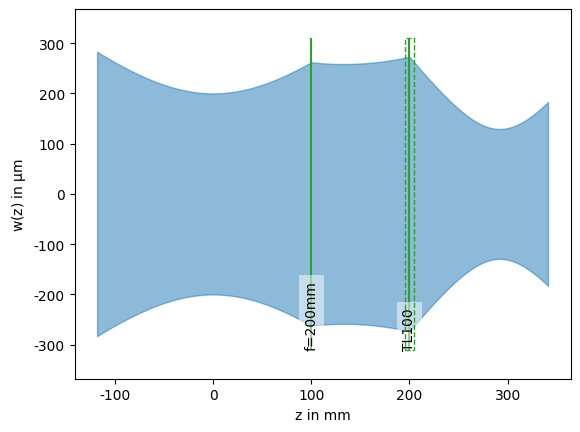
Lenses without a name are labeled with their focal length in axial units which is millimeters by default.
Thick Lenses#
Lenses may also be modeled as thick lenses. In this they are specified by their input and output radius of curvature, their refractive index and their thickness. The signs of the radius of curvature follow the standard optics convention where positive radii correspond to surfaces that are convex when viewed from the input side of the lens. This means that a biconvex lens will have a positive input radius of curvature and a negative output radius of curvature.
Like thin lenses, we can also give thick lenses physical margins and names. The physical margins extend from the plane centered between the two surfaces of the lens and are independent of the optical thickness.
Since the beam propagation model requires that the beam exits an element in the same axial position as it entered it, the ray transfer matrices for thick lenses include a negative amount of free space propagation before and after the lens. This way the sum of all propagation matrices that the element is made up of, is zero. One notable consequence of this treatment is that the calculated and plotted beam radius is not accurate for axial positions that are inside thick lenses. This also means that there may be a small discontinuity in beam radius across thick lenses in the plotted beam profiles.
Thick lenses are modeled using the ThickLens class. For convenience and interoperability with thin lenses, the thick lens class also has a property focal_length that yields the approximate focal length calculated using the lensmaker’s equation. Thick lenses cannot be described using a single focal length, so this value should only be used as an estimate and not for calculations.
[3]:
from corset import ThickLens

thick_lens = ThickLens(in_roc=50e-3, out_roc=-50e-3, thickness=5e-3, refractive_index=1.5)
print(repr(thick_lens))
print(f"{thick_lens.focal_length = }")
ThickLens(in_roc=0.05, out_roc=-0.05, thickness=0.005, refractive_index=1.5, left_margin=0.0, right_margin=0.0, name=None)
thick_lens.focal_length = 0.05084745762711864
We can model flat interfaces by specifying an infinite radius of curvature, i.e. float(‘inf’) or np.inf. You can also use the alias ThickLens.FLAT instead to improve readability and convey intent.
[4]:
plano_convex = ThickLens(ThickLens.FLAT, 50e-3, 10e-3, 1.5)
print(repr(plano_convex))
ThickLens(in_roc=inf, out_roc=0.05, thickness=0.01, refractive_index=1.5, left_margin=0.0, right_margin=0.0, name=None)
Blocks#
Thick lenses can also be used to model blocks of material with flat interfaces like crystals. These can quickly be created using the :meth:~corset.core.ThickLens.block convenience method. If no margins are provided here, the left and right margins will be set to half the thickness of the block. Note that, just like all other thick lenses, the beam radius is not accurate inside the block.
[5]:
crystal = ThickLens.block(thickness=40e-3, refractive_index=1.5)
print(repr(crystal))
ThickLens(in_roc=inf, out_roc=inf, thickness=0.04, refractive_index=1.5, left_margin=0.02, right_margin=0.02, name=None)
Tip
While the solver will generally not allow for any overlap between elements and other mode matching regions, there is a special case that allows a block to be located inside a Passage region. This is useful for ensuring that the beam actually fits through the block.
Lens Lists#
Since you will likely use the same set of lenses for most mode matching problems, it makes sense to build a database of these lenses. This database can be saved and reloaded to avoid having to look up and specify their parameters every time you want to use them. These features are implemented as part of the LensList class which mostly behaves like a list of lenses but also offerst additional functionality.
[6]:
from corset import LensList

my_lenses = LensList([
    ThinLens(50e-3, name="TL50"),
    ThinLens(100e-3, name="TL100"),
    ThickLens(ThickLens.FLAT, -100e-3, 10e-3, 1.5, name="PX200"),
    ThickLens(300e-3, -300e-3, 5e-3, 1.5, name="BX300"),
])
my_lenses
[6]:
| name | type | shape | focal_length | left_margin | right_margin | in_roc | out_roc | thickness | refractive_index | lens | |
|---|---|---|---|---|---|---|---|---|---|---|---|
| 0 | TL50 | thin | | | 50 mm | 0 mm | 0 mm | ThinLens(...) | ||||
| 1 | TL100 | thin | | | 100 mm | 0 mm | 0 mm | ThinLens(...) | ||||
| 2 | PX200 | thick | [) | 200 mm | 0 mm | 0 mm | inf mm | -100 mm | 10 mm | 1.5 | ThickLens(...) |
| 3 | BX300 | thick | () | 301 mm | 0 mm | 0 mm | 300 mm | -300 mm | 5 mm | 1.5 | ThickLens(...) |
Lens lists will display as a DataFrame in Jupyter notebooks, showing the lenses’ parameters. To allow both thin and thick lenses in the same list, the DataFrame will contain NaN for parameters that do not apply to thin lenses, and display the approximate focal length calculated using the lensmaker’s equation for thick lenses.
Lens lists can be saved to and loaded from CSV files using the save_csv() and load_csv() methods. These forward to pandas.DataFrame.to_csv() and pandas.read_csv() respectively, so they accept the same kinds of inputs. E.g., URLs to easily load lens lists from online repositories.
[7]:
from IPython.display import Pretty

my_lenses.save_csv("my_lenses.csv")
Pretty("my_lenses.csv")
[7]:
name,type,focal_length,left_margin,right_margin,in_roc,out_roc,thickness,refractive_index
TL50,thin,0.05,0.0,0.0,,,,
TL100,thin,0.1,0.0,0.0,,,,
PX200,thick,0.2,0.0,0.0,inf,-0.1,0.01,1.5
BX300,thick,0.30083565459610023,0.0,0.0,0.3,-0.3,0.005,1.5
When loading lenses from CSV files, the lens type is determined from the type field and must be consistent with the parameters specified.
[8]:
LensList.load_csv("my_lenses.csv") == my_lenses
[8]:
True
Beam Corset also includes some built-in lens databases that can be loaded using the LensList.load() class method.
[9]:
LensList.load("quantum_control/Thorlabs_BX_L1064_M10")
[9]:
| name | type | shape | focal_length | left_margin | right_margin | in_roc | out_roc | thickness | refractive_index | lens | |
|---|---|---|---|---|---|---|---|---|---|---|---|
| 0 | TBX25.4 | thick | () | 26 mm | 5 mm | 5 mm | 24 mm | -24 mm | 9 mm | 1.506635 | ThickLens(...) |
| 1 | TBX50 | thick | () | 51 mm | 5 mm | 5 mm | 51 mm | -51 mm | 5 mm | 1.506635 | ThickLens(...) |
| 2 | TBX100 | thick | () | 102 mm | 5 mm | 5 mm | 102 mm | -102 mm | 4 mm | 1.506635 | ThickLens(...) |
| 3 | TBX150 | thick | () | 152 mm | 5 mm | 5 mm | 154 mm | -154 mm | 3 mm | 1.506635 | ThickLens(...) |
| 4 | TBX200 | thick | () | 203 mm | 5 mm | 5 mm | 206 mm | -206 mm | 3 mm | 1.506635 | ThickLens(...) |
| 5 | TBX250 | thick | () | 254 mm | 5 mm | 5 mm | 257 mm | -257 mm | 3 mm | 1.506635 | ThickLens(...) |
| 6 | TBX300 | thick | () | 305 mm | 5 mm | 5 mm | 309 mm | -309 mm | 2 mm | 1.506635 | ThickLens(...) |
| 7 | TBX400 | thick | () | 407 mm | 5 mm | 5 mm | 412 mm | -412 mm | 2 mm | 1.506635 | ThickLens(...) |
| 8 | TBX500 | thick | () | 508 mm | 5 mm | 5 mm | 515 mm | -515 mm | 2 mm | 1.506635 | ThickLens(...) |
| 9 | TBX1000 | thick | () | 1017 mm | 5 mm | 5 mm | 1030 mm | -1030 mm | 2 mm | 1.506635 | ThickLens(...) |
It is also possible to load and combine multiple lens lists in one load call:
[10]:
LensList.load("quantum_control/Thorlabs_BX_L1064_M10", "quantum_control/Thorlabs_PX_L1064_M10")
[10]:
| name | type | shape | focal_length | left_margin | right_margin | in_roc | out_roc | thickness | refractive_index | lens | |
|---|---|---|---|---|---|---|---|---|---|---|---|
| 0 | TBX25.4 | thick | () | 26 mm | 5 mm | 5 mm | 24 mm | -24 mm | 9 mm | 1.506635 | ThickLens(...) |
| 1 | TBX50 | thick | () | 51 mm | 5 mm | 5 mm | 51 mm | -51 mm | 5 mm | 1.506635 | ThickLens(...) |
| 2 | TBX100 | thick | () | 102 mm | 5 mm | 5 mm | 102 mm | -102 mm | 4 mm | 1.506635 | ThickLens(...) |
| 3 | TBX150 | thick | () | 152 mm | 5 mm | 5 mm | 154 mm | -154 mm | 3 mm | 1.506635 | ThickLens(...) |
| 4 | TBX200 | thick | () | 203 mm | 5 mm | 5 mm | 206 mm | -206 mm | 3 mm | 1.506635 | ThickLens(...) |
| 5 | TBX250 | thick | () | 254 mm | 5 mm | 5 mm | 257 mm | -257 mm | 3 mm | 1.506635 | ThickLens(...) |
| 6 | TBX300 | thick | () | 305 mm | 5 mm | 5 mm | 309 mm | -309 mm | 2 mm | 1.506635 | ThickLens(...) |
| 7 | TBX400 | thick | () | 407 mm | 5 mm | 5 mm | 412 mm | -412 mm | 2 mm | 1.506635 | ThickLens(...) |
| 8 | TBX500 | thick | () | 508 mm | 5 mm | 5 mm | 515 mm | -515 mm | 2 mm | 1.506635 | ThickLens(...) |
| 9 | TBX1000 | thick | () | 1017 mm | 5 mm | 5 mm | 1030 mm | -1030 mm | 2 mm | 1.506635 | ThickLens(...) |
| 10 | TPX25.3 | thick | [) | 26 mm | 5 mm | 5 mm | inf mm | -13 mm | 12 mm | 1.506635 | ThickLens(...) |
| 11 | TPX49.8 | thick | [) | 51 mm | 5 mm | 5 mm | inf mm | -26 mm | 5 mm | 1.506635 | ThickLens(...) |
| 12 | TPX99.7 | thick | [) | 102 mm | 5 mm | 5 mm | inf mm | -51 mm | 4 mm | 1.506635 | ThickLens(...) |
| 13 | TPX149.5 | thick | [) | 153 mm | 5 mm | 5 mm | inf mm | -77 mm | 3 mm | 1.506635 | ThickLens(...) |
| 14 | TPX199.3 | thick | [) | 203 mm | 5 mm | 5 mm | inf mm | -103 mm | 3 mm | 1.506635 | ThickLens(...) |
| 15 | TPX299 | thick | [) | 305 mm | 5 mm | 5 mm | inf mm | -154 mm | 2 mm | 1.506635 | ThickLens(...) |
Use LensList.available() to list the available databases.
In addition to normal scalar indexing, we can also index into the list lens by name. To ensure that this is always unambiguous, lens names must be unique within a lens list. This is enforced by the constructor.
[11]:
print(repr(my_lenses[0]))
print(repr(my_lenses["PX200"]))
ThinLens(focal_length=0.05, left_margin=0.0, right_margin=0.0, name='TL50')
ThickLens(in_roc=inf, out_roc=-0.1, thickness=0.01, refractive_index=1.5, left_margin=0.0, right_margin=0.0, name='PX200')
We can also index into lens lists using lists of indices or names to easily create a subset of a lens list.
[12]:
my_lenses[[0, 3]]
[12]:
| name | type | shape | focal_length | left_margin | right_margin | in_roc | out_roc | thickness | refractive_index | lens | |
|---|---|---|---|---|---|---|---|---|---|---|---|
| 0 | TL50 | thin | | | 50 mm | 0 mm | 0 mm | ThinLens(...) | ||||
| 1 | BX300 | thick | () | 301 mm | 0 mm | 0 mm | 300 mm | -300 mm | 5 mm | 1.5 | ThickLens(...) |
[13]:
my_lenses[["TL50", "BX300"]]
[13]:
| name | type | shape | focal_length | left_margin | right_margin | in_roc | out_roc | thickness | refractive_index | lens | |
|---|---|---|---|---|---|---|---|---|---|---|---|
| 0 | TL50 | thin | | | 50 mm | 0 mm | 0 mm | ThinLens(...) | ||||
| 1 | BX300 | thick | () | 301 mm | 0 mm | 0 mm | 300 mm | -300 mm | 5 mm | 1.5 | ThickLens(...) |
Lens lists can be concatenated with other lens lists or normal lists using the + operator.
[14]:
new_list = my_lenses + [ThinLens(focal_length=25e-3, name="TL25")]
new_list
[14]:
| name | type | shape | focal_length | left_margin | right_margin | in_roc | out_roc | thickness | refractive_index | lens | |
|---|---|---|---|---|---|---|---|---|---|---|---|
| 0 | TL50 | thin | | | 50 mm | 0 mm | 0 mm | ThinLens(...) | ||||
| 1 | TL100 | thin | | | 100 mm | 0 mm | 0 mm | ThinLens(...) | ||||
| 2 | PX200 | thick | [) | 200 mm | 0 mm | 0 mm | inf mm | -100 mm | 10 mm | 1.5 | ThickLens(...) |
| 3 | BX300 | thick | () | 301 mm | 0 mm | 0 mm | 300 mm | -300 mm | 5 mm | 1.5 | ThickLens(...) |
| 4 | TL25 | thin | | | 25 mm | 0 mm | 0 mm | ThinLens(...) |